
介紹🔖#
Ingress 是 Kubernetes 中的一個 API 物件,它能夠將 HTTP/HTTPS 流量,依據 URL 路徑或主機名稱(Host),精準路由到對應的 Service。並提供 SSL/TLS 終端、虛擬主機設定等功能,讓我們能夠更方便的管理 Kubernetes 中的服務。
外部負載平衡📌#
使用 Yaml 建立 Ingress 物件時,Kubernetes 會自動建立一個外部負載平衡器,並將其與 Ingress 物件關聯。這個負載平衡器會監聽指定的端口,並將流量轉發到對應的 Service。
apiVersion: networking.k8s.io/v1
kind: Ingress
metadata:
  name: my-ingress
spec:
  ingressClassName: nginx
  rules:
    - host: example.com
      http:
        paths:
          - path: /
            pathType: Prefix
            backend:
              service:
                name: my-web-service
                port:
                  number: 80
          - path: /api
            pathType: Prefix
            backend:
              service:
                name: my-api-service
                port:
                  number: 8081
    - host: test.example.com
      http:
        paths:
          - path: /
            pathType: Prefix
            backend:
              service:
                name: my-test-service
                port:
                  number: 80
          - path: /api
            pathType: Prefix
            backend:
              service:
                name: my-test-api-service
                port:
                  number: 8081
Yaml 範例中,定義了兩個主機名稱 (Host) 的路由規則,分別是 example.com 和 test.example.com。每個主機名稱下都有兩個路徑規則,分別將流量轉發到不同的 Service。
Cloud Armor🔒#
Cloud Armor 的翻譯是指盔甲的意思,這是由 GCP 提供的網路安全服務,具有分散式阻斷攻擊(DDos)防護機制、網路應用程式防火牆。可以搭配 Load Balancer、Cloud CDN 來強化網路安全服務。
如何將 Cloud Armor 套用在 Ingress 上面呢❓
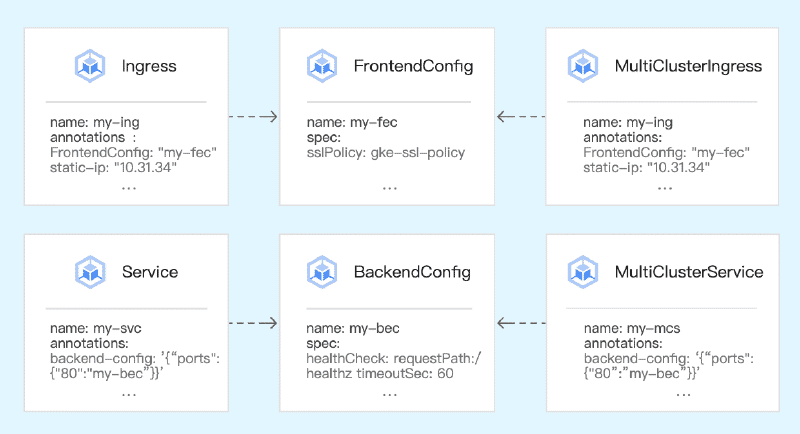
使用 backendConfig 來設定,透過 backendConfig 可以將 Cloud Armor 的安全防護套用在 Ingress 的後端 Service 上面。
首先,使用 Yaml 建立 backendConfig 物件。securityPolicy 的 name 參數是指 Cloud Armor 的安全防護策略名稱,需要先在 GCP 上建立好 Cloud Armor 的安全防護策略,才能在 backendConfig 中使用。
apiVersion: cloud.google.com/v1
kind: BackendConfig
metadata:
  name: my-backend-config
spec:
  securityPolicy:
    name: my-security-policy
接著,Ingress 的 Yaml 中新增 backendConfig 的設定,透過 cloud.google.com/backend-config 的 annotation 來指定後端 Service 使用的 backendConfig。
apiVersion: networking.k8s.io/v1
kind: Ingress
metadata:
  name: my-ingress
  annotations:
    cloud.google.com/backend-config: '{"ports": {"80":"my-backend-config"}}'
spec:
  ingressClassName: nginx
  rules:
    - host: example.com
...
下圖是 Cloud Armor 的防護策略範例,允許 IP 為 34.12.88.293 的訪問,拒絕 IP 為 114.1.26.197。
flowchart LR

classDef green fill:#dff0d8,stroke:#3c763d,stroke-width:2px,color:#000
classDef blue fill:#d9edf7,stroke:#31708f,stroke-width:2px,color:#000
classDef yellow fill:#fcf8e3,stroke:#8a6d3b,stroke-width:2px,color:#000
classDef red fill:#f2dede,stroke:#a94442,stroke-width:2px,color:#000
classDef gray fill:#ddd,stroke:#666,stroke-width:2px,color:#000

c1(34.12.88.293):::green
c2(114.1.26.197):::red
extip(External IP):::blue
ing((ingress)):::yellow
bf(backend-config):::gray
svcweb(web-service):::blue

subgraph Armor
Allow(Allow 34.12.88.293/32):::green
Deny(Deny 114.1.26.197/32):::red
end

Armor -.- bf -.- ing

c1 --訪問成功--> extip
c2 --訪問失敗--> extip
extip --> ing

ing --> svcweb
內部負載平衡📌#
Ingress 除了預設的外部負載平衡器之外,還可以使用內部負載平衡器。
關鍵是需要在 Ingress 的 annotation 中指定 kubernetes.io/ingress.class: "gce-internal",這樣 Kubernetes 就會建立一個內部負載平衡器。
apiVersion: networking.k8s.io/v1
kind: Ingress
metadata:
  name: my-internal-ingress
  annotations:
    kubernetes.io/ingress.class: "gce-internal"
spec:
  rules:
    - host: internal.example.com
      http:
        paths:
          - path: /
            pathType: Prefix
            backend:
              service:
                name: my-internal-service
                port:
                  number: 80
Network Endpoint Group🌐#
Network Endpoint Group (NEG) 翻譯是網路端點群組,借助 NEG,可以將流量更精細的分配到負載均衡器的後端。
沒有使用 NEG 的情況下,Ingress 會將流量轉發到 Service 再轉發到 Pod,這樣會增加一個跳數,降低效能。
flowchart LR

classDef green fill:#dff0d8,stroke:#3c763d,stroke-width:2px,color:#000
classDef blue fill:#d9edf7,stroke:#31708f,stroke-width:2px,color:#000
classDef yellow fill:#fcf8e3,stroke:#8a6d3b,stroke-width:2px,color:#000
classDef red fill:#f2dede,stroke:#a94442,stroke-width:2px,color:#000
classDef gray fill:#ddd,stroke:#666,stroke-width:2px,color:#000

subgraph node1
podweb1(web pod 1):::blue
podapi1(api pod 1):::blue
iptable1(iptables):::gray
end
subgraph node2
podweb2(web pod 2):::blue

iptable2(iptables):::gray
end

svcweb(web service):::yellow
svcapi(api service):::yellow

ing((ingress)):::yellow

ing --> svcweb
ing --> svcapi

svcweb --> iptable1
svcweb --> iptable2
svcapi --> iptable1

iptable1 --> podweb1
iptable1 --> podapi1
iptable2 --> podweb2
Service 的 Yaml 中新增 cloud.google.com/neg: '{"ingress": true}' 的 annotation,這樣 Kubernetes 就會建立一個 NEG,並將 Pod 加入到 NEG 中。
apiVersion: v1
kind: Service
metadata:
  name: my-internal-service
  annotations:
    cloud.google.com/neg: '{"ingress": true}'
spec:
  type: ClusterIP
  selector:
    app: my-internal-app
  ports:
    - protocol: TCP
      port: 80
      targetPort: 8080
此時,Ingress 會將流量直接轉發到 NEG,再由 NEG 將流量轉發到 Pod,這樣就可以減少一個跳數,提高效能。
flowchart LR

classDef green fill:#dff0d8,stroke:#3c763d,stroke-width:2px,color:#000
classDef blue fill:#d9edf7,stroke:#31708f,stroke-width:2px,color:#000
classDef yellow fill:#fcf8e3,stroke:#8a6d3b,stroke-width:2px,color:#000
classDef red fill:#f2dede,stroke:#a94442,stroke-width:2px,color:#000
classDef gray fill:#ddd,stroke:#666,stroke-width:2px,color:#000

subgraph node1
podweb1(web pod 1):::blue
podapi1(api pod 1):::blue
end
subgraph node2
podweb2(web pod 2):::blue
end

svcweb(web service):::yellow
svcapi(api service):::yellow

ing((ingress)):::yellow

ing --> svcweb
ing --> svcapi

svcweb --> podweb1
svcweb --> podweb2
svcapi --> podapi1